Onboarding examples
Real-world Onboarding examples pulled from complete funnels, each in the context that makes it work.
18 examples
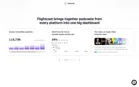
- Flightcast — “Hey, I’m Fey.” A product tour before the form“Let’s see what Flightcast can do for your show.” A guide character walks through a made-up show’s numbers before anything is asked: 115,736 plays across every platform, “Tuesday episodes reach 2.4× more listeners”, listeners in 96 countries, $4,922 earned in 30 days, then a full sample dashboard. A “See plans” button sits in the corner.View asset →

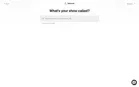
- Flightcast — “What’s your show called?”For existing shows: search by name or paste an RSS feed, with “The Diary Of A CEO” as the example. The capture stopped here because it needs a real show.View asset →
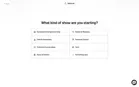
- Flightcast — Starting a new showPick a category (business, health, faith, personal growth, culture, tech, news), then the show details: name, author, an author email that “Apple and Spotify use to verify your identity”, description, categories. The new show is set up before any account or plan. The capture stopped at this form.View asset →
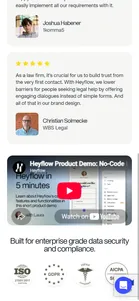
- Heyflow — Trial signup (app.heyflow.com/signup)The funnel's primary exit, and the destination five ads point at directly with no landing page in between — a deliberate no-LP path for warmer traffic. Three signup routes (Google, Microsoft, email) with the friction-removal promise repeated, then testimonials and an ISO/GDPR/HIPAA/SOC2 badge row doing enterprise reassurance on a self-serve page. A product-demo video sits mid-page; see the second capture, which recovers it.View asset →
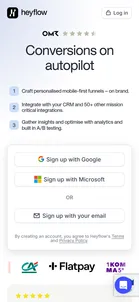
- Heyflow — Trial signup — product demo embed"Heyflow in 5 minutes with Laura" — a product demo placed below the signup buttons rather than above them, so it serves hesitation rather than interrupting intent. Captured as a separate viewport shot: the page's own full-page render silently drops this iframe.View asset →
- Heyflow — Product onboarding after signup (not captured)TODO: capture — everything past account creation. Requires registering a real account on Heyflow, which would also start the trial clock and whatever in-product nurture sequence follows. The entire Retain stage of this funnel is unobserved.View asset →

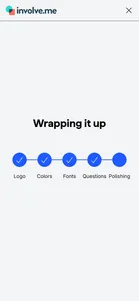
- involve.me — Create with AI (it builds your funnel before you sign up)The cleverest step in the funnel. You don't need an account to start. You describe the funnel you want, optionally give your website so it can match your brand, and watch the AI build it: logo, colours, fonts, questions. Only then does it ask you to sign up, and it names what it built ("Register or Login to use the AI generated Personalized Meal Plan") without showing it. You've already put in the effort, and the result is waiting behind the sign-up form.View asset →
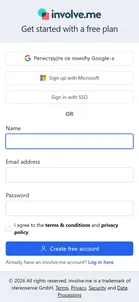
- involve.me — Free sign-up pageWhere every ad, on every platform, ends up. "Get started with a free plan": sign up with Google, Microsoft or your company login, or with name, email and password. No card, and no questions about your company, so the funnel asks for as little as possible up front. If you came from the AI builder, one line changes to name the funnel waiting for you. (The Google button shows in the language of whoever is looking at it.)View asset →
- involve.me — First visit and upgrade (not captured)TODO: capture. What a new free user sees first, what the free plan can't do, and where it asks you to upgrade.View asset →
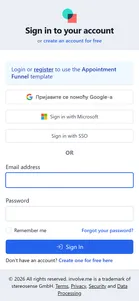
- involve.me — Log-in page ("Login or register to use the Appointment Funnel template")Click "Get the template for FREE" and you land on "Sign in to your account". The page knows why you came and names the template, but it assumes you already have an account. Most people clicking an ad don't. Creating an account is the second option on the page, not the first.View asset →
- involve.me — Free sign-up pageThe same sign-up page the current funnel uses: Google, Microsoft or your company login, or name, email and password. No card. The page doesn't mention the template, so nothing on screen reminds you why you're signing up. (The Google button shows in the language of whoever is looking at it.)View asset →
- involve.me — Opening the template (not captured)TODO: capture. Whether a new account opens straight into the promised template, and what the first visit looks like. It needs a real sign-up.View asset →
- Salesforce — TODO: the free account and the upgrade pathNot captured yet: the free account itself, what it nudges towards Starter, what happens at 60 days of inactivity, and the “team will be in touch” follow-up. Needs either a real phone number (the free sign-up) or the single-use code from the inbox (the Starter path via the header button).View asset →
- Salesforce — TODO: the trial org and onboardingNot captured yet: the trial account, its guided onboarding, the welcome emails and the “team will be in touch” call. Needs a sign-up with a real phone number.View asset →
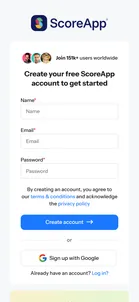
- ScoreApp — "Create your free ScoreApp account to get started"Where every page ends. Name, email and password, or "Sign up with Google", and no card. Beside the form is a quote from an entrepreneur and awards founder, not a feature list: by this point the visitor has been sold, and the page only needs to be short.View asset →
- ScoreApp — First login, the book and the welcome emails (not captured)TODO: capture. Creating an account is behind a captcha that needs a person. What a new account opens on, whether the AI builder starts straight away, how the promised book is sent, and the emails a free user gets are still to be seen.View asset →
- Tony Robbins — After the $97 payment (not captured)TODO: capture. App access and any post-purchase offer weren't reached without paying.View asset →
- Tony Robbins — After the $97 payment (not captured)TODO: capture. Delivery is presumably through the Tony Robbins app, and whatever is offered after payment wasn't seen.View asset →